
Real photos beat stock photos on a business website because they prove you exist. A picture of your actual team, your shop and your product answers the questions a new visitor is quietly asking: who are these people, is this place real and what will I get? A stock photo of smiling models in a bright office can't answer any of that, and most people can spot one in a second.
Stock photos aren't useless. They're fine for backgrounds, textures and ideas you can't photograph. But for the people and products at the heart of your business, real photos win, and you can get a good start with the phone in your pocket. Here's why it matters, when stock is okay and how to shoot your own.
Do stock photos hurt your website?
They usually don't hurt you directly. They just don't help, and they take up space that could be selling for you. Nielsen Norman Group ran eye tracking studies on how people look at photos on the web and found that users ignore stock photos of generic people, while photos of real people and real products often get close attention. In one study of a company's About page, people spent about 10% more time looking at the team portraits than reading the bios, even though the bios took up far more of the page.
The reason is simple. People scan a page looking for information. A photo of your real crew is information. A photo of models shaking hands is decoration, and people have learned to skip decoration.
There's a second cost that's harder to measure. When your homepage looks like it could belong to any business in your category, you lose the thing that makes people pick you. A plumber in Rio Rancho, a bakery in Santa Fe and a law office in Albuquerque can all buy the same handshake photo. Nobody else can use a photo of your team.
What real photos tell your customers
Every real photo on your site is a small piece of proof:
- Your team: these are the people who will answer the phone, show up at your house or pack your order.
- Your place: there's a real storefront, kitchen, shop or office, and here's what it looks like when you pull up.
- Your product: this is exactly what you'll get, not an idealized version of something similar.
- Your work in action: you've done this before, for people like you.
That's why we put real photos high on our website redesign checklist. As DSI's Marketing Manager, Vince rebuilt the Document Solutions, Inc. website page by page with new branding and real team photos instead of generic office stock.
A real example: the Jerky Fixx family
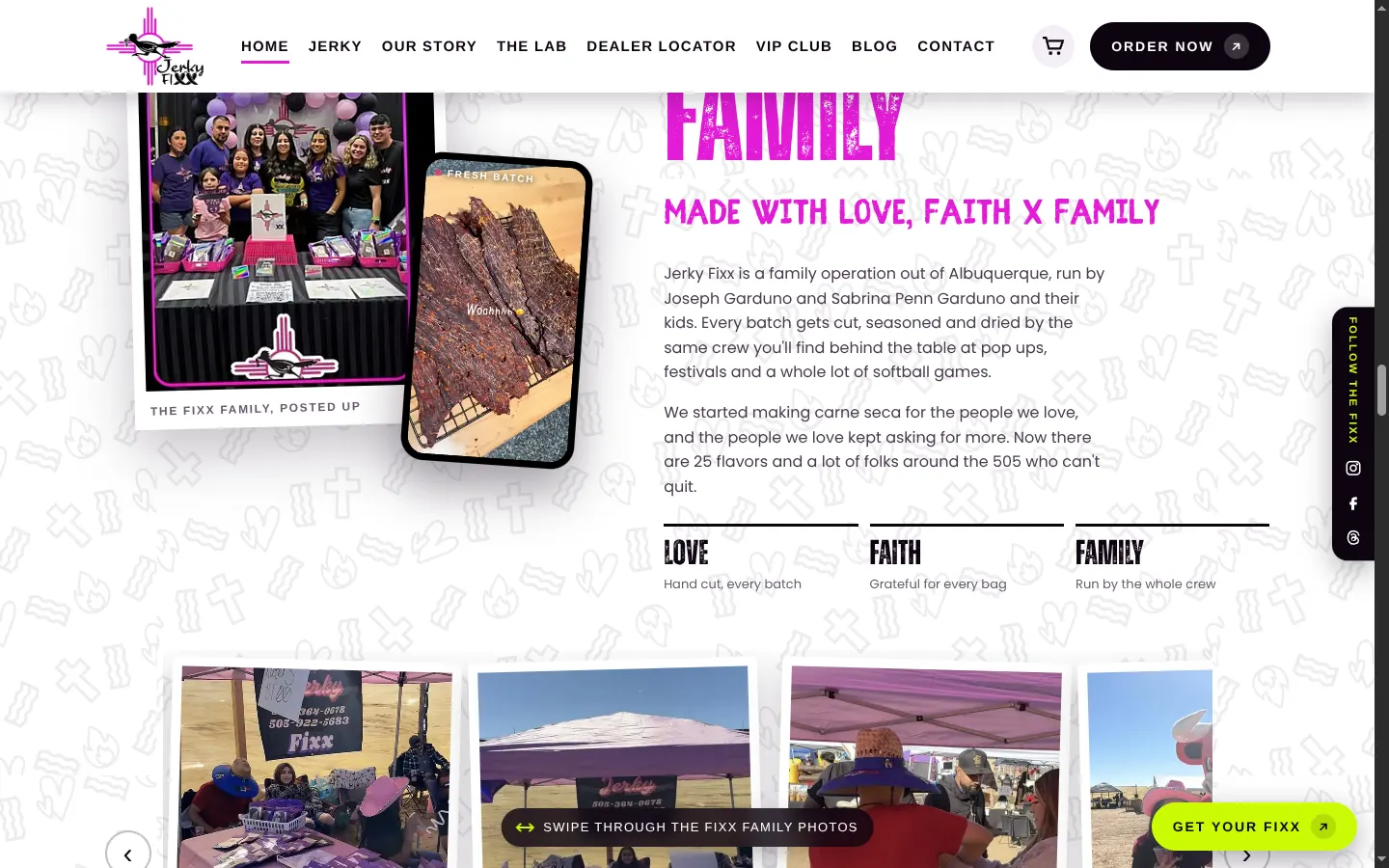
The image at the top of this page is from the Jerky Fixx website, a family run beef jerky and carne seca business in Albuquerque. The family's first draft of a site was made with AI only, and it had no photos of the family, the booth or the jerky. It looked like it could belong to any snack brand. We wrote about that side of it in why AI-only websites all look the same.
The new site leans the other way. It has a family photo carousel with shots from their booth, a section called The Fixx Family that names the owners, Joseph Garduno and Sabrina Penn Garduno, and photos of the actual jerky. Those photos do something no stock image could: they show the same people you'll meet behind the table at a pop up, and the same product you'll take home.
When stock photos are okay
Stock has its place. It works well for:
- Backgrounds and textures behind text, like paper, stone, sky or fabric.
- Ideas you can't photograph, such as a concept in a blog post or a seasonal graphic.
- Placeholders while you build, as long as you swap them out before launch.
- Places you can't easily get to, like a wide landscape shot, if you license it properly.
Where stock goes wrong is when it pretends to be you. A photo of a model labeled as your "team," or a stock burger on a restaurant site, sets up an expectation the real thing has to live up to. If customers notice, it chips away at trust. The same goes for AI generated images of your product. If your product is good, take a picture of it.
One more thing. An image showing up in a Google search doesn't mean you're allowed to use it. Use photos you took, photos you paid someone to take, or stock with a license that covers business use, and keep a note of where each one came from.
How to take your own business photos with a phone
You don't need a studio to get started. A modern phone and a little care go a long way, especially for everyday shots and social posts.
Get the light right
- Shoot near a big window or outside in open shade. New Mexico's midday sun is harsh, so early morning and late afternoon are easier on faces and food.
- Turn off overhead fluorescent lights when you can. Mixed light makes skin and food look strange.
- Skip the flash for products. It flattens everything and adds glare.
Keep it clean and steady
- Wipe the lens. Phone lenses live in pockets and get smudged.
- Clear the background. Move the trash can, the stack of boxes and the cord.
- Walk closer instead of using digital zoom, which makes photos look soft.
- Brace your elbows or use a cheap tripod for product shots.
Shoot for where it's going
- Take horizontal shots for website banners and vertical shots for stories and reels. Take both while you're there.
- Leave some empty space around your subject so a designer can crop it or put text beside it.
- Shoot more than you need. Ten tries of the same shot usually gives you one great one.
Ask first
Get permission before you post photos of employees or customers, and respect a no. A quick "Mind if we use this on our website?" goes a long way.
Make your photos work for search, too
Real photos help people, and a few small steps help Google understand them. Google's own image SEO best practices point to sharp, high quality images, placing images near the text they relate to, short descriptive file names instead of names like IMG_4021.jpg, and alt text that describes what's in the photo.
So "albuquerque-bakery-green-chile-bread.jpg" with alt text like "Fresh green chile bread on the counter at our Nob Hill bakery" beats a stock file name and an empty alt tag. Compress your images before uploading, too, so big phone photos don't slow your site down on mobile.
The same photos can pull double duty on your Google Business Profile. We cover that in how to get your Albuquerque business on Google Maps.
When to bring in a pro
Phone photos are great for keeping things fresh. A professional shoot makes sense for the images that carry the most weight: your homepage hero, your main product shots, team portraits and anything going to print. A planned shoot can also cover your website, social media, ads and signs in one go, so you're not scrambling for a usable photo every time you need one.
If you'd like help planning or shooting photos of your team, space and products, take a look at our video and photo production services or book a call below.
Frequently asked questions
Is it bad to use stock photos on a business website?
Not always. Licensed stock works for backgrounds, textures and ideas you can't photograph yourself. The problem is using it to stand in for your team, your space or your product, because visitors can usually tell, and it makes you look like everyone else.
Can I use photos I find on Google Images for my website?
Not safely. An image showing up in a search doesn't mean you have the right to use it, and most photos online are owned by someone. Use photos you took, photos you paid someone to take, or images with a license that covers business use.
Are phone photos good enough for a business website?
Often, yes, for everyday shots like your team at work, your storefront or new products. Use natural light, wipe the lens, skip digital zoom and keep the background clean. For your homepage hero and main product images, a professional shoot is usually worth it.
What photos should a small business website have?
Start with your team, your location or work site, your product or service in action, and you with real customers if they agree to it. Those cover the questions visitors have: who you are, where you are and what they'll get.
 Work with DYAD MarketectsVideo & Photo Production in Albuquerque →

Drafted with AI assistance from DYAD project notes, then reviewed, edited and fact-checked by Vincent King.