To design content for an LED sign or video board that people actually read, treat every slide like a billboard, not a flyer. Give it one idea, a few words, type big enough to read from the back of the room or the street, and colors with strong contrast. Build it at the screen's exact pixel size, leave it up long enough to read twice, and check it on the real screen before you call it done.
That's the short version. The longer version matters because a screen is a different medium than print or social media. It's bright, it moves, people see it from a distance and usually while doing something else. Here's what works, with lessons from our show graphics for the video boards at Rio Rancho Events Center.
Why most LED sign content doesn't get read
Most screens fail for the same few reasons. Someone takes a flyer or an Instagram post, drops it on the screen, and hopes for the best. The result usually has:
- Too many words. A paragraph that works on paper is impossible to read in a few seconds from 40 feet away.
- Small type. Dates, prices and web addresses turn into tiny smudges.
- Low contrast. Text on top of a busy photo, or two bright colors fighting each other, washes out on an LED panel.
- The wrong size. Artwork made for a different shape gets stretched, squished or cropped.
- Slides that change too fast. The viewer gets halfway through and it's gone.
Fix those five things and your screen is already ahead of most of the ones you drive past.
How many words should go on a digital sign?
Fewer than you think. Texas A&M's digital signage guidelines say viewers typically spend 10 to 15 seconds with a piece of content, and they recommend 30 to 40 words per asset at most. They also use a handy "3x5 rule": three lines of five words, or five lines of three.
For an outdoor sign that people see from a moving car, go even shorter. A good pattern is:
- The headline: what it is, in as few words as possible. "Fall Festival Saturday."
- One detail: the thing they need to act. A time, a place or an offer you're actually running.
- The next step: a short web address, a phone number or "This Saturday, 10am." Not all three.
If you have more to say, split it into more slides instead of cramming one. The University of Michigan's signage guidance puts it well: use phrases instead of full sentences, and rewrite until it's as tight as it can be.
How big should text be on an LED sign?
Big enough to read from the farthest spot your audience will be. A common rule of thumb in the sign industry is about one inch of letter height for every 10 feet of viewing distance for the best impact. Signs Now's visibility chart, for example, pairs 6 inch letters with about 60 feet. People can technically read letters from much farther away, but "technically readable" isn't the goal when someone only glances.
A few type tips that help on any screen:
- Use a clean, bold font. Thin scripts and delicate serifs break apart on LED pixels. Save your fancy accent font for one or two big words, if at all.
- Avoid long words in all caps at small sizes. They're harder to read quickly.
- Make the most important thing the biggest thing. If the date is what matters, don't let a logo outrank it.
Colors and contrast that hold up on LED screens
LED screens are bright, and brightness makes weak color choices look worse. Go for strong contrast: light text on a dark background or dark text on a light one. Texas A&M asks for a contrast ratio of at least 3:1, and a free checker like WebAIM's contrast checker will tell you in seconds whether your colors pass.
If text has to sit on a photo, put a solid or darkened panel behind it, or add an outline or shadow. Don't let the text sit straight on a busy background and hope the viewer figures it out.
And keep it on brand. Your screen is one more place people see you, right next to your signs, website and social posts. If you already have a brand style guide, pull your colors and fonts from it, then pick the highest contrast combinations for the screen.
Design at the screen's exact size
Every screen has its own pixel dimensions, and you should design at exactly that size. Ask your sign company, installer or venue for the resolution and the shape before you start. The University of Michigan also points out that media made smaller than the screen's resolution looks poor on a high resolution display.
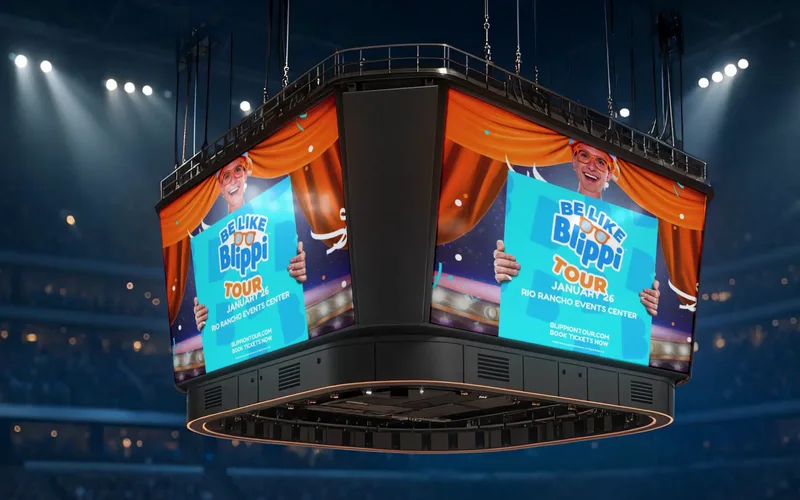
Screens come in some unusual shapes. When we made show graphics for Rio Rancho Events Center, the in-bowl video board was a familiar 1920 x 1080, but the ribbon board that wraps the arena's upper level was 2512 x 24 pixels. That's more than 100 times wider than it is tall. On a board like that, every letter has to earn its place, names have to read from across the arena in a split second, and artwork has to repeat cleanly along the length so nothing important ends up where half the crowd can't see it.
A few sizing habits that save headaches:
- Keep a safe margin. Hold text and logos back from the edges so nothing gets cut off or lost in the frame.
- Make a separate version for each screen. A wide board, a portrait LED poster and a square social post are three different layouts, not one file resized three ways.
- Export in the format the player wants. Check whether the system takes images, video or both, and what file types it accepts.
Motion: use it to grab attention, not to show off
Movement is the big advantage a screen has over a printed sign. A little motion pulls eyes toward the screen. Too much makes it impossible to read. Some simple rules:
- Animate things in, then let the message sit still long enough to read.
- Move one thing at a time. If the background, the logo and the text all move at once, nothing gets read.
- Skip fast flashing and strobing effects. They're hard to read and uncomfortable to look at.
- Don't rely on sound. Most signs are silent, and the ones that aren't are usually competing with a crowd.
If you've already invested in video, a screen is a great place to reuse it. Short, silent cuts of a brand film work well on displays, the same way we plan versions for social and the web in our post on getting one brand film to do several jobs.
How long should each slide stay up?
Long enough to read comfortably, ideally twice. There's no single magic number because it depends on where people are. A waiting room or lobby can hold longer messages because people are sitting there. A busy hallway or a sign people drive past needs shorter messages, so each one can be read in the time someone actually has.
Also think about the whole loop. If someone stands in front of your screen for a minute, what do they see? A short loop with a few strong messages beats a long one where the important slide comes around once every five minutes.
Test it on the real screen
Your computer monitor lies. Colors look different on an LED panel, small details disappear, and something that reads fine at arm's length can vanish at 50 feet. Before you sign off:
- Load the content on the actual screen.
- Walk to the farthest spot your audience will be, or drive past it if it faces a street.
- Glance for three seconds, then look away. Could you say what it was about, when and where?
- Check it in different light, because daylight and night can change how the screen reads.
Plan who will keep the screen fresh
A screen showing last month's event tells people nobody's paying attention. Before the screen goes up, decide who updates it, how often and with what templates. Simple, on brand templates with set spots for the headline, details and next step make it easy for anyone on your team to post something that still looks right.
Training matters here too. When we trained Global Give-A-Book's team on their 5 LED posters, the goal was for the team to feel confident running the screens themselves. Here's what they said:
"I wanted to take a moment to sincerely thank you for the outstanding training you provided for GGAB's 5 LED posters. Your patience, professionalism, and willingness to carefully walk us through each step made the experience extremely helpful and accommodating for our team. We truly appreciate the time and support you invested in helping GGAB feel confident using this technology to better promote early childhood literacy and community impact throughout New Mexico."
Global Give-A-Book, Albuquerque, NM
A quick checklist before anything goes on screen
- One idea per slide, and as few words as possible.
- Type sized for the farthest viewer, in a bold, clean font.
- Strong contrast that passes a checker.
- Built at the screen's exact pixel size, with a safe margin.
- Motion that supports the message, then holds still.
- On the screen long enough to read twice.
- Tested on the real screen, from where people actually stand.
- A plan and templates for keeping it current.
If you have a video board, an LED sign or a lobby screen and you'd like content that people actually stop and read, take a look at our video and photo production services for New Mexico businesses, including digital signage and show graphics, or book a call and tell us about your screen.
Frequently asked questions
How many words should go on an LED sign or digital screen?
As few as you can. Texas A&M's digital signage guidelines suggest 30 to 40 words at most per asset and a layout of about three lines of five words. On an outdoor sign people drive past, aim for even less: a headline, one detail and a next step.
What size should graphics be for an LED sign or video board?
Design at the screen's exact pixel dimensions, which your sign company or venue can give you. A standard video board might be 1920 x 1080, while a ribbon board can be something like 2512 x 24 pixels. Designing at the wrong size leads to stretching, cropping or blurry text.
How big should the letters be on a sign?
A common sign industry rule of thumb is about one inch of letter height for every 10 feet of viewing distance for the best impact. Then test it: stand where your audience will be and see if you can read it in a glance.
How long should each slide stay on a digital sign?
Long enough for someone to read it comfortably, ideally twice. Busy hallways and drive by signs need short messages, while waiting rooms can hold longer ones. Texas A&M notes viewers typically spend 10 to 15 seconds with digital signage content.
 Work with DYAD MarketectsVideo & Photo Production in Albuquerque →

Drafted with AI assistance from DYAD project notes, then reviewed, edited and fact-checked by Vincent King.