For print, signs and embroidery, you need a vector version of your logo: an AI, EPS, SVG or vector PDF file. For your website and social media, you need PNG files with a transparent background, plus an SVG if your website can use one. A JPG alone won't cover you, and it's usually what's behind that email from your print shop asking if you have "a better version of the logo."
A complete logo package goes beyond file types. It includes each layout of your logo, in each color version, along with your exact color codes and fonts. Here's what each file does, what to send to which vendor, and a checklist you can use to see what's missing from your folder.
Vector vs. raster: the one difference that matters
Every logo file falls into one of two groups, and knowing which one you have solves most logo file problems.
- Raster files (JPG, PNG, WebP, TIFF) are made of pixels. They work well on screens, but they have a fixed amount of detail. Make one bigger than it was built for and it turns soft or blocky.
- Vector files (AI, EPS, SVG and many PDFs) are built from lines and curves defined by math. Adobe explains that vectors can be resized without losing quality, which is why the same logo can go on a business card or a billboard.
Think of your vector file as the master copy. You can always export a PNG from a vector, but you can't get a true vector out of a PNG without redrawing it.
Which logo file types do you need?
- AI: The editable Adobe Illustrator source file. Keep this one safe. It's what a designer needs to make changes later.
- EPS: An older vector format many sign shops, printers and embroiderers can still open.
- PDF: Easy to open and share, and the format many print shops ask for. It can hold vector artwork, but it can also just wrap a pixel image, so a PDF isn't automatically a vector.
- SVG: A vector format made for the web. It stays sharp on any screen, and it's often a good fit for website logos.
- PNG: The everyday file for screens. It supports a transparent background, so your logo can sit on a color or photo without a white box around it.
- JPG: Fine for a quick email or a photo-style graphic. It has no transparency, so it's a poor choice for most logo use.
What to send your printer, sign shop and embroiderer
Print: cards, flyers, menus and brochures
Send a vector PDF, AI or EPS file. If the printer needs a raster file, it should be at least 300 DPI at the size it will actually print. That last part matters. A logo that's 300 DPI at one inch wide won't still be 300 DPI when it's stretched to six inches. Printers also work in CMYK or Pantone inks rather than the RGB colors your screen uses, so include your print color codes.
Signs, banners and vehicle graphics
Send vector files, every time. Large format work is where a small raster file falls apart fastest, and some sign work, like cut vinyl, follows the outline of the shapes, so it needs clean vector paths. If your logo includes text, ask your designer to convert the type to outlines so the shop's computer doesn't swap in a different font.
Embroidery: polos, caps and jackets
Embroidery is the odd one out. A machine doesn't print your logo. It follows a stitch file, so a shop has to digitize your artwork first, mapping out each stitch and thread color. The result is a machine format such as DST, not a file you'd open in a design program. Send the shop your vector file, then ask whether they'll keep the digitized file and whether you can have a copy for future orders.
The file is only half of it. The logo also has to be simple enough to stitch. As one example, Printful's embroidery guidelines call for text at least 0.25 inches tall, lines at least 0.05 inches thick, up to 6 thread colors and no gradients on standard embroidery. Every shop has its own limits, so ask yours before you order. If your main logo is detailed, a simplified version made just for stitching usually solves it.
That simplified version can be a big deal for how your brand looks. Vince sees companies stuck with screen printing because their logos can't be embroidered, which he says "cheapens a luxury brand look." When the design has complex gradients or lines too thin to stitch, you lose out on the sleek polos and caps that would rep your brand around town.
Websites and social media
Use an SVG for your website header when your site supports it, and use PNGs everywhere else. For social profiles, you'll want a simple square or circular version, since the full logo may get too small to read. You'll also want a tiny icon version for your favicon, the little image in a browser tab.
Why AI logos often fail the file test
Most AI image tools hand you a flattened image, not a vector. It can look beautiful on your screen and still fall flat in real use. Vince sees the same problems over and over: scale it up and it's pixelated, run it through an AI upscaler and it gets cloudy and distorted, scale it down and a complex design stops being legible. Then there's what he calls "prompt and pray," where you keep asking the tool for one simple change and it changes other things you wanted to keep.
Here's a real example. A new client sent Vince the AI generated logo on the left side of the slider below. It's soft and cloudy, with fuzzy halos around every edge. He rebuilt it as a clean vector in Illustrator, with crisp edges and smooth gradients, so it can now scale to any size. Drag across the image to compare.


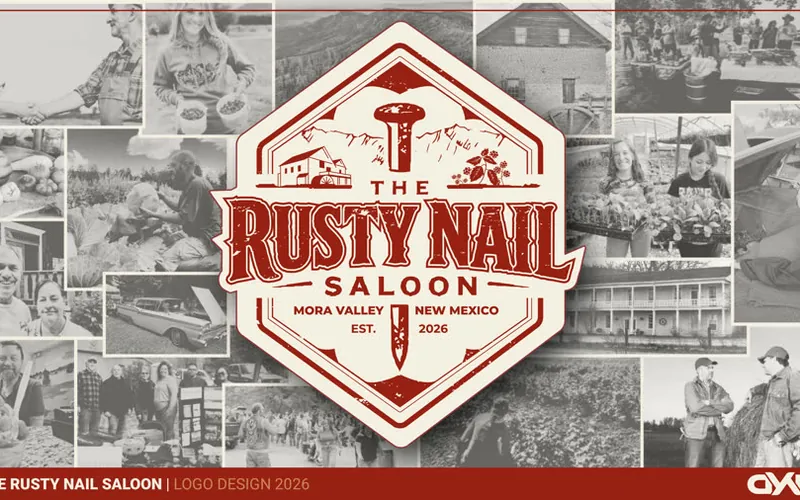
Note what a vector rebuild does and doesn't solve. It fixes sharpness and scale, but a logo built on gradients would still need a solid color version for embroidery. The same goes for detail. In the logo package for The Rusty Nail Saloon, we took elements from an AI concept and rebuilt the logo by hand so it was scalable and embroidery ready. If your logo needs that kind of work, our post on whether to rebrand or refresh a logo can help you decide how far to go.
The logo file checklist
Open your logo folder and check off what you have.
Formats
- Editable source file (AI)
- Vector files for vendors (EPS and PDF)
- SVG for the web
- PNG files with transparent backgrounds, in a few sizes
Layouts
- Primary logo
- Horizontal version for wide spaces
- Stacked version for square spaces
- Icon or small mark for social profiles and favicons
Color versions
- Full color
- One color
- All black
- All white for dark backgrounds
The one color and black versions earn their keep on stamps, engraving, single color printing and anywhere a vendor charges by the ink color.
Color codes and fonts
- HEX and RGB for screens
- CMYK for print
- Pantone for signs, shirts and packaging, if you use them
- Font names, and where to get them
Don't count on color conversions to match perfectly. Pantone's own Color Bridge guide describes its CMYK equivalents as the closest industry-standard matches, not exact ones. If a color really matters, ask for a proof before a big order. Thread colors are a separate step too, since embroidery shops match your logo to the thread they stock.
How to check if your logo is really a vector
This trips up a lot of people, because the file name can lie. A pixel image placed inside an AI, EPS or PDF file is still a pixel image. Here's a quick test:
- Open the file and zoom in as far as you can.
- Look at a curved edge. If it stays crisp, you're likely looking at a vector.
- If it goes blocky or blurry, there's a raster image inside.
- Not sure? Send it to your sign shop or designer and ask. They can tell in seconds.
Renaming a JPG to .ai or .eps won't work either. If your logo only exists as a low quality image, it needs to be traced or redrawn. Automatic tracing can handle simple shapes, but text and fine details usually need a person.
What if you can't find your logo files?
Start by asking whoever made the logo, then check with past vendors. Printers, sign shops and web developers often keep client artwork on file. Search your old email for attachments ending in .ai, .eps, .pdf or .svg too.
Once you've found the good files, keep them in one shared folder, and list which one goes where in your brand style guide. If you're hiring a designer now, get the file list in writing before work starts. At DYAD, exact deliverables are spelled out in the proposal before work begins, so you know what you'll have when the project ends.
Need your logo rebuilt or organized?
If your folder came up short, or your logo won't survive an embroidery order, we can help you figure out what it needs. Every project starts with a BRAND$TORM™ session, so the fix fits how your business actually uses its logo. Take a look at our branding and logo design services in Albuquerque to get started.
Frequently asked questions
What logo file format is best for printing?
A vector file is best, usually a PDF, AI or EPS. Vector artwork stays sharp at any size, so the same file works on a business card and a banner. If a printer asks for a raster file instead, send a PNG or TIFF that's at least 300 DPI at the final print size.
What file do I send for logo embroidery?
Send your vector file and ask the shop what they prefer. Unless you already have a digitized stitch file, the shop will turn your artwork into one before anything runs on the machine. Ask whether they keep that file, and whether you can get a copy for future orders.
Can I turn a JPG logo into a vector?
Not by renaming or re-saving it. A JPG is made of pixels, so a real vector has to be traced or redrawn. Automatic tracing can help with simple shapes, but a logo with text or fine detail usually needs to be rebuilt by hand.
How do I know if my logo file is really a vector?
Open it and zoom in as far as you can. If the edges stay crisp at extreme zoom, it's likely a vector. If they turn blocky or blurry, there's a pixel image inside, even if the file ends in .ai, .eps or .pdf.
 Work with DYAD MarketectsBranding & Logo Design in Albuquerque →

Drafted with AI assistance from DYAD project notes, then reviewed, edited and fact-checked by Vincent King.